Description
This document describes how to troubleshoot EM500-SMTC captures an error value.
Checklist
Step 1: Firmware and Decoder Updates
Confirm the gateway and decoder are updated to the latest versions.
(The resolutions of the new and old versions of SMT/SMTC are different.
Hardware v2: uses resolution 0.01.
Hardware v1: before firmware version 2.36, the resolution was 0.5.)
This decoder can used for both versions simultaneously:
Decoder:
https://github.com/Milesight-IoT/SensorDecoders/blob/main/em-series/em500-smtc/em500-smtc-decoder.js
Firmware:
https://www.milesight.com/support/resources/firmware#environmental-sensing-series
Step 2: Check Wiring and Physical Connections
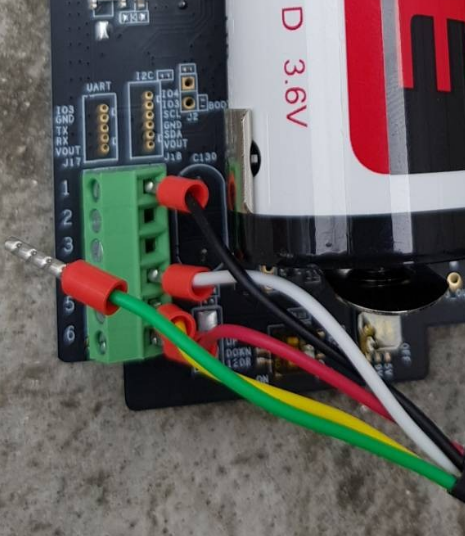
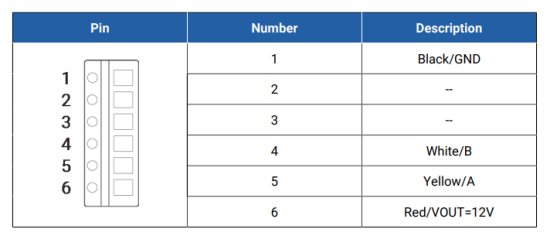
Ensure all wiring is properly connected, with no loose or broken wires,connectors for corrosion or damage.
Step 3: Sensor Installation and Environmental Factors
- 1. Verify that the sensor is installed correctly, buried in the soil and compacted firmly. Avoid any air gaps around the sensor, as improper installation may result in inaccurate readings.
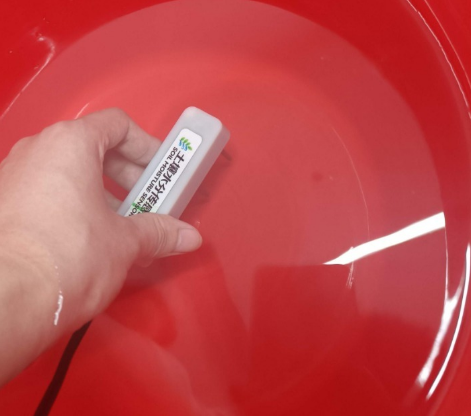
- 2. Ensure that the probe is at the appropriate depth. If installed too deep, water may not reach that depth, leading to lower moisture readings. Check for recent irrigation or rainfall events that could affect measurements. If only the surface is wet but the sensor is installed deeper, the readings may indicate low moisture.If the humidity readings are abnormal, briefly immerse the probe in water to verify that it approaches 100%.
Step 4: Sensor Comparison and Replacement
Please swap the probe with a known good unit to perform a comparative test.
If the replacement probe works correctly, the original probe may be have problem.
Record the test results and share them with us.
Step 5: Please refer to this document to connect the sensor to the PC via the internal USB and obtain the log.
How to Get Milesight Node Log File
Step 6: Please contact Milesight IoT Support.
We would like you to send us the situation and result of your troubleshooting via screenshot and text description to improve the speed of problem troubleshooting.
You can create Tickets or send an email directly to Milesight IoT Support.
Ticket System: https://support.milesight-iot.com
Email address: iot.support@milesight.com
----END----
Was this article helpful?
That’s Great!
Thank you for your feedback
Sorry! We couldn't be helpful
Thank you for your feedback
Feedback sent
We appreciate your effort and will try to fix the article