Description
In Milesight Gateway, LoRaWAN related features are divided into two sections, “Packet Forwarder” and “Network Server”. Both of them support changing LoRa frequency plan. After you change the LoRa frequency plan on either section and click Save & Apply, it will be also changed on the other one.
Frequency plan is changeable in each module only:
For 868 module: EU868, IN865, RU864
For 915 module: US915, AU915, KR920, AS923-1&2&3&4
This article will guide you how to change LoRa frequency plan in Milesight gateway.
Requirement
Milesight LoRaWAN Gateway UG6x or UG56 or SG50 or EG71.
Configuration
1. Packet Forwarder
Go to Packet Forwarder ->Radios. Under Radio Channel Setting you can choose different channel plans in drop-down box where all supported frequencies are displayed in this gateway. After the frequency is chosen, the center frequency and frequency points would change to default values automatically and can be manually changed anytime.
UG6X & UG56:
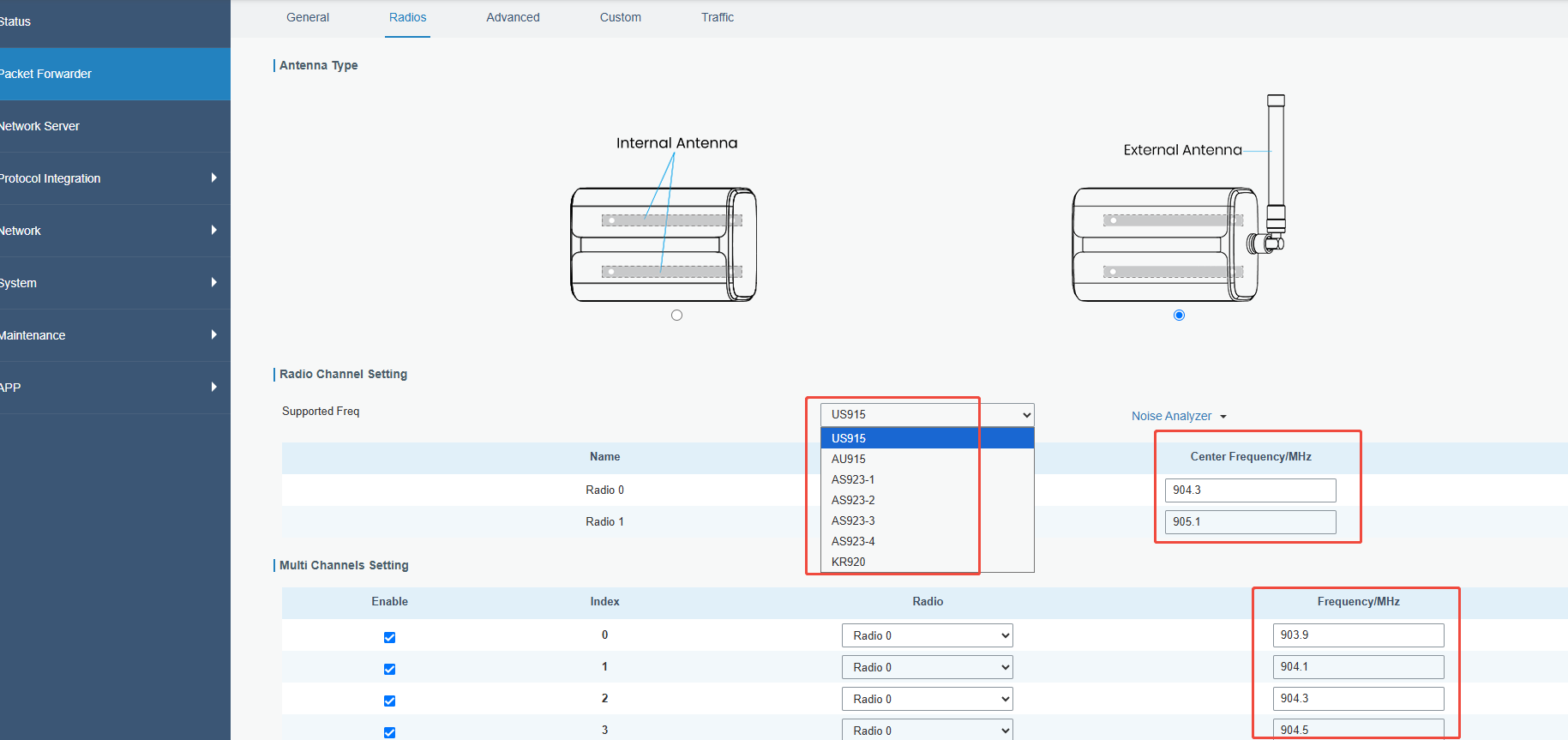 Click Save & Apply.
UG63v2 & SG50:
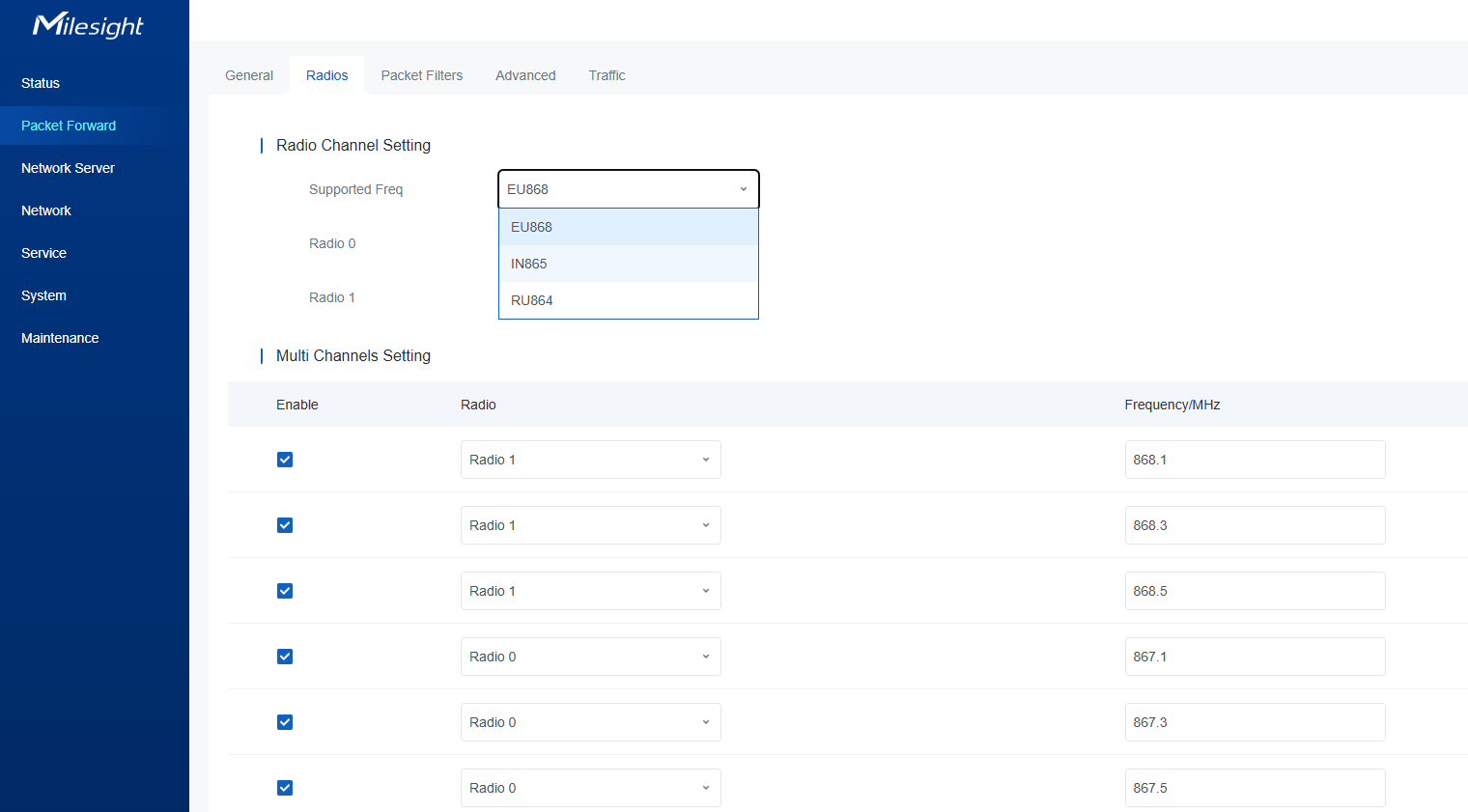
Note: All package forwarder settings will be cleaned if you change the frequency.
Appendix
Default Frequency supported on Milesight Gateway. AS923-2&3&4 is only applied to gateway.
Channel | Default Frequency/MHz |
CN470 | 471.9, 472.1, 472.3, 472.5, 472.7,472.9, 473.1, 473.3 (8~15) |
EU868 | 868.1, 868.3, 868.5, 867.1, 867.3, 867.5, 867.7, 867.9 |
IN865 | 865.0625, 865.4025, 865.6025, 865.985, 866.185, 866.385, 866.585, 866.785 |
RU864 | 868.9, 869.1, 869.3, 867.3, 867.5, 867.7, 867.9, 868.1 |
AU915 | 916.8, 917, 917.2, 917.4, 917.6, 917.8, 918, 918.2(8~15) |
US915 | 903.9, 904.1, 904.3, 904.5, 904.7, 904.9,905.1, 905.3 (8~15) |
KR920 | 922.1, 922.3, 922.5, 922.7, 922.9, 923.1, 923.3, 923.5 |
AS923 | 923.2, 923.4, 922, 922.2, 922.4 ,922.6, 922.8 ,923 |
AS923-2 | 921.2, 921.4, 921.6, 921.8, 922, 922.2, 922.4, 922.6 |
2. Network Server
Go to Network Server-> General -> Channel Plan Setting. You can choose different channel plan in drop-down box where all supported frequencies are displayed in this gateway.
Channel mask works similarly as in the center frequency and frequency points, and is designed to only allow the enabled frequencies to work. To leave it blank means using the default standard usable channels specified in the LoRaWAN regional parameters document.
For Milesight gateway channel is represented by decimal index. Every index indicates a frequency point.
Note:
If you need to use the Embedded NS of the gateway to receive data, please make sure that the Radio channel settings in the Packet Forwarder are consistent with the Channel Plan and Channel in the Network Server.
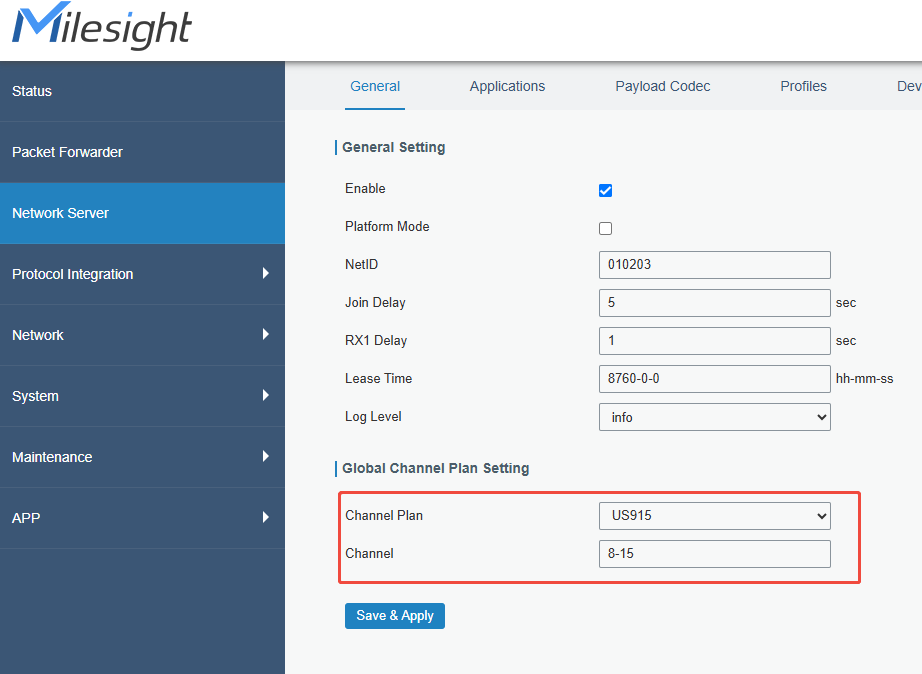
Click Save & Apply.
Cheat sheet
EU868
| Channel Mask (outdated) | Frequency/MHz | Index |
| 0F | 868.1 | 0 |
| 868.3 | 1 | |
| 868.5 | 2 | |
| 868.7 | 3 | |
| F0 | 868.9 | 4 |
| 869.1 | 5 | |
| 869.3 | 6 | |
| 869.5 | 7 |
Enter their index in the Channel box to enable them in the global communication between this NS and end-devices.
E.g.:
| Channel | Enabled frequencies |
| 0-2 | 868.1, 868.3, 868.5 |
| 0,2 | 868.1, 868.5 |
| 0-2,7 | 868.1, 868.3, 868.5, 869.5 |
AS923
| Channel Mask (outdated) | Frequency/MHz | Index |
| 0F | 923.2 | 0 |
| 923.4 | 1 | |
| 922.8 | 2 | |
| 923 | 3 | |
| F0 | 922 | 4 |
| 922.2 | 5 | |
| 922.4 | 6 | |
| 922.6 | 7 |
Enter their index in the Channel box to enable them in the global communication between this NS and end-devices.
E.g.:
| Channel | Enabled frequencies |
| 0-2 | 923.2,923.4,922.8 |
| 0,2 | 923.2,922.8 |
| 0-2,7 | 923.2,923.4,922.8,922.6 |
AU915
| Channel Mask (outdated) | Frequency/MHz | Channel |
| 00 00 00 00 00 00 00 00 FF | 915.2-916.6 | 0-7 |
| 00 00 00 00 00 00 00 FF 00 | 916.8-918.2 | 8-15 |
| 00 00 00 00 00 00 FF 00 00 | 918.4-919.8 | 16-23 |
| 00 00 00 00 00 FF 00 00 00 | 920.0-921.4 | 24-31 |
| 00 00 00 00 FF 00 00 00 00 | 921.6-923.0 | 32-39 |
| 00 00 00 FF 00 00 00 00 00 | 923.2-924.6 | 40-47 |
| 00 00 FF 00 00 00 00 00 00 | 924.8-926.2 | 48-55 |
| 00 FF 00 00 00 00 00 00 00 | 926.4-927.8 | 56-63 |
| FF 00 00 00 00 00 00 00 00 | 915.9-927.1 | 64-71 |
Enter their index in the Channel box to enable them in the global communication between this NS and end-devices.
E.g.:
| Channel | Enabled frequencies |
| 8-15 | 916.8-918.2 |
| 8,9 | 916.8, 917.0 |
| 0,8-15 | 915.2, 916.8-918.2 |
US915
| Channel Mask (outdated) | Frequency/MHz | Channel |
| 00 00 00 00 00 00 00 00 FF | 902.3-903.7 | 0-7 |
| 00 00 00 00 00 00 00 FF 00 | 903.9-905.3 | 8-15 |
| 00 00 00 00 00 00 FF 00 00 | 905.5-906.9 | 16-23 |
| 00 00 00 00 00 FF 00 00 00 | 907.1-908.5 | 24-31 |
| 00 00 00 00 FF 00 00 00 00 | 908.7-910.1 | 32-39 |
| 00 00 00 FF 00 00 00 00 00 | 910.3-911.7 | 40-47 |
| 00 00 FF 00 00 00 00 00 00 | 911.9-913.3 | 48-55 |
| 00 FF 00 00 00 00 00 00 00 | 913.5-914.9 | 56-63 |
| FF 00 00 00 00 00 00 00 00 | 903.0-914.2 | 64-71 |
Enter their index in the Channel box to enable them in the global communication between this NS and end-devices.
E.g.:
| Channel | Enabled frequencies |
| 8-15 | 903.9-905.3 |
| 8,9 | 903.9, 904.1 |
| 0,8-15 | 902.3,903.9-905.3 |

--END--
Was this article helpful?
That’s Great!
Thank you for your feedback
Sorry! We couldn't be helpful
Thank you for your feedback
Feedback sent
We appreciate your effort and will try to fix the article